Your Ad 
Here
Showing posts with label How-to. Show all posts

Tuesday, May 01, 2012

Windows systems admin Q&A


What is DHCP?
DHCP is Dynamic Host Configuration Protocol. This server can provide IP address configurations such as IP address, subnet mask, default gateway, WINS address, DNS address etc to its clients.

How does DHCP work?
DHCP server has a scope of IP addresses to be issued along with other IP configurations. When we bring up a DHCP client it sends out a broadcast request to find a DHCP server to get an IP address. The DHCP server acknowledges the request and provides the IP configuration to the client with a leasing period.

What is a DHCP reservations?
To dedicate an IP address for a client we can use DHCP reservations. Always this client will get the same IP address from the DHCP server. We would need to know the MAC address of the client to make a reservation.

What is an exclusion?
A range of IP addresses can be excluded from the DHCP server scope, so that those IP addresses can be given as static IP addresses for some servers. Excluded IP addresses won’t be issued to the DHCP clients.

What IS DNS? 
DNS is Domain Naming System. This server provides domain name to IP address naming resolution to its clients.

What is an A record?
A record in DNS server provides forward lookup or host name to IP address naming resolution.

What is an CName record?
CName record or canonical name record helps hostname to have aliases.

What is a PTR record?
PTR record or Pointer record in DNS server provides reverse lookup or IP address to host name naming resolution.

What is nslookup?
Nslookup is a command line utility to help us gather and troubleshoot DNS related information and issues.

What is DNS scavenging?
It’s a feature in DNS that deletes expired records based on their Timestamps.

What is Active Directory integrated zone?
If a DNS server has an Active Directory integrated zone, the DNS zone information will be stored in the Active directory database.

What is the basic advantage of using integrated zone?
The DNS database will be stored in the Active directory database. So the DNS replication will take place along with the AD replication.

What is dynamic DNS registration?
When we bring up a DNS client, it can go directly to the DNS server and register their name and IP address in the DNS database. So we need not create DNS records manually.

What is WINS?
WINS stand for Windows Internet Naming System, helps to resolve NetBIOS name to IP address naming resolution in Windows domain.

What is a Universal Group/Global Group/Local group?
Global Group – is to organize the users in to a group in AD.
Local Group – is to give access to the resources in AD.
We will have to make Global group as the member of local group, so that users can access the resources.
Universal group can be used if the users and resources are located in multiple domains.

What is the main advantage to using a Universal Group?
If the users and resources are located in multiple domains we need to use Universal Group, since it supports forest level scope and group nesting.

What is a global catalog?
Global catalog server is a domain controller in the Active Directory domain which will keep at least some information about all the objects in the forest.

What are the 5 Flexible Single Master Operations roles and what do they do?
Schema master – Controls any changes made in the schema.
Domain naming master- Controls adding and removing domains.
RID master – Controls issuing of unique Relative Identifier number for the domain controllers in the domain.
PDC emulator – Acts as a Primary domain controller for pre-Windows 2000 machines. Also handles time synchronization in the domain and changes in the GPOs.
Infrastructure master- Helps to update groups and its membership information between domains.

PDC  Emulator FSMO role – name the 3 functions it does
1.            Time synchronization.
2.            Creating or editing of GPOs is handled by this server.
3.            Password changes and account lockouts are handled by this server.

Which of the FSMO roles are forest wide/which are domain wide?
Schema master and Domain naming master are forest wide.
RID master, PDC emulator and Infrastructure master are domain wide.

What is a Site and when should you define one in Active directory (ie. basic criteria for establishing one)
Well connected IP subnets are called as sites. If there is a thin link between two locations we should consider them as two different sites in AD.

What is a bridgehead server?
In a multi site environment, Bridgehead servers on each site, handles the replication between two different sites.

What is the Intersite Topology Site Generator?
Every site has a domain controller which acts as an “Intersite Topology Site Generator “which helps to create connection objects between intersite domain controllers for active directory replication.

What is Group Policy and how can it be applied in Active Directory?
Group policy is some set of rules and configuration settings to restrict users working environment.
When these policies are applied, registry settings will be modified in the user level or computer level.
GPOs can be applied in Site, domain or OU level in Active Directory.

What is Group Policy order of precedence?
Group policy applied in the following order:
Local policy
Site Policy
Domain policy
OU policy

What is Group Policy inheritance?
Group policies applied in the top level container can flow down in the of AD hierarchy.
For example a GPO applied in the domain level will be inherited by the OUs in the domain and to its child OUs.

What is No Override?
“No Override” Group policies cannot be blocked by the “Block inheritance” option in AD.
If you want a policy to be applied in the entire tree structure, you need to use this option.

What is block inheritance?
If you prefer a policy to be not getting applied on an OU through inheritance, you can choose this “Block inheritance” option.

How can you apply group policy to only ½ the objects in an OU vs. all of them?
A policy will get applied only if the objects are having Read and Apply group policy permissions.
Taking off these permissions will help the objects not to get applied.

What is Group Policy loopback processing?
If you want the user settings should be determined by the computer accounts policy rather than the user accounts policy, we need to consider using loopback processing.

Why would you need or use Group policy loopback processing?
In some situations like kiosks, we need the machine policy to get applied regardless of which user logging in. In those situations we would use loopback processing.

What are the two types of group policies you can apply to an object?
There are “Local group policy” and “Domain group policy”
These policies are having two section in them “Computer configuration” and “User configuration”

What are some tools you can use to troubleshoot Group Policy that wasn’t applying properly to an object or in conflict?
Gpresult.exe command line tool.
Rsop MMC snap in.

How long does replication take within a site and intersite?     
Within a site – every 15 seconds.
Between sites – every 180 minutes.

How would you restore an object or OU in active directory?
To restore an object or OU we should have already taken “System state data” backup.
If we have the backup, we need to do the Authoritative restore by rebooting the domain controller in “Directory service restore mode”. We will use ntdsutil command to restore the objects.

Tuesday, December 06, 2011

How to copy a printer driver from one computer to another?

Use backup and restore option in Print Migrator 3.1 to take one printer from one server to another windows machine.

Download from here
http://www.microsoft.com/download/en/details.aspx?id=25311

How to delete duplicate lines along with its original in a text file?

Here is a way to delete repeated duplicate lines along with its original in a text file. If there are two lines with same string in it,it will remove both.
Finding double entries and delete both of them in a text file.
Do it in unix.
sort filename | uniq –u
Out put to a text file.

Friday, September 02, 2011

Setting up Arabic Input locale in Windows Vista

All of the files needed for you to view the Arabic Characters should
already installed in Windows Vista. However, you will need to install the
Arabic Keyboard Input so that you can type with the Arabic characters.
1) Click on Start button and then select Control Panel.
2) Under Clock,Language, and Region area, select Change keyboards or other input
methods link. Note: If you are in the Control Panel Classic View, then double click
on Regional and Language Options icon and click on the tab keyboard
and languages.
3) Click on the Change keyboards…button then click on Add…
button.
4) Select the input language and keyboard.
Expand "Arabic (Egypt)" tree then Expand "Keyboard" tree from the list. Check
Keyboard Arabic (101)
5) Click OK to add the selected keyboards to the Installed Services.
6) Click OK to confirm and apply your new language settings.
7) Open any Windows application then make sure the Language Bar menu on top is set to the input language you want.

Wednesday, August 03, 2011

How to use handle -c to a kill process in Windows?

You are getting this error "Cannot delete _vxfiVspCacheFile_1.VSP: There has been a sharing violation. The source or destination file may be in use."This _vxfiVspCacheFile_2.VSP file is in the folder NBU_VSP_Cache.This is happend because of netbackup client is caching opened files.You would soon run out of space in the local drives if there is no cap on it.

To resolve this issue or to delete this file do the following. You might have to download handle.exe or processexplorer.exe will help.

Run handle.exe > output.txt
Find out the process id and the handle number used.

For example in the following output file process id is 8 and the handle to be closed is 218
So run handle -c 218 -p 8

How to run handle -c example:

C:\handle>handle -c 218 -p 8

Handle v3.46
Copyright (C) 1997-2011 Mark Russinovich
Sysinternals - www.sysinternals.com

218: File (---) C:\NBU_VSP_Cache\_vxfiVspCacheFile_1.VSP
Close handle 218 in System (PID 8)? (y/n) Y

Handle closed.

Now you can delete the file.

Handle output file:

Handle v3.46
Copyright (C) 1997-2011 Mark Russinovich
Sysinternals - www.sysinternals.com

------------------------------------------------------------------------------
System pid: 8 NT AUTHORITY\SYSTEM
EC: File (RW-) \Device\Mup
15C: File (-W-) C:\pagefile.sys
218: File (---) C:\NBU_VSP_Cache\_vxfiVspCacheFile_1.VSP
250: File (RW-) C:\FTP

Friday, July 29, 2011

How to find Windows XP edition is 32 bit or 64 bit?

Run Msinfo32.exe.
You will get Help and Support Center screen.
Here under "Pick a task" click "Use Tools to view your computer information and diagnose problems "
You would get tools screen.
Here click "My Computer Information" and "View general system information about this computer "
My Computer Information - General , Processor, Version if it says x86 Family it is 32-bit edition
My Computer Information - General , Processor, Version if it says x64-based PC it is 64-bit edition

Thursday, July 21, 2011

How to find last logon user information on Windows?

For Windows Local user accounts:
For local SAM user accounts use the following commmand
net user
This command will give lot more information about the user along with last logon date and time.In case if you need for multiple user accounts last login information, run this command in a batch file and export to a text file.
eg:
net user user1
net user user2
net user user3

Keep above lines in the file called userlist.bat.
Then run the following
userlist.bat >output.txt

This output text file can be imported to an Excel sheet (In the import data wizard choose "Fixed width").So the sheet will have multiple Columns. Then use the Autofilter feature to filter the required coulms out like "user name" and "Last Logon" etc.

For Windows domain user accounts:
For Active directory domain user accounts use a tool called UsrStat. This would pull the data from the ADS PDC. This command-line tool displays the username, full name, and last logon date and time for each user in a given domain.
You can download this tool from the following location:
http://www.dynawell.com/download/reskit/microsoft/win2000/usrstat.zip

Wednesday, July 20, 2011

How to fix PostgreSQL "could not open process token: error code 5" Error?

PostgreSQL Database Server 8.3 Service (pgsql-8.3) is not starting in windows.Getting “The PostgreSQL Server service on Local Computer started and then stopped. Some services stop automatically if they have no work to do, for example, the Performance Logs and Alerts service”.
Throwing "could not open process token: error code 5" error in the Application log of event viewer.

Resolution: Make sure the PostgreSQL service account is NOT member of administrators group.It is not allowed as per postgresql.

Tuesday, July 05, 2011

How to check if a firewall inbetween two machines is blocking a particular port?

To check port status between two machines follow the following steps.
Usually firewalls between two networks could block a port or ports.
Some applications might needs specific port open for client server communication.

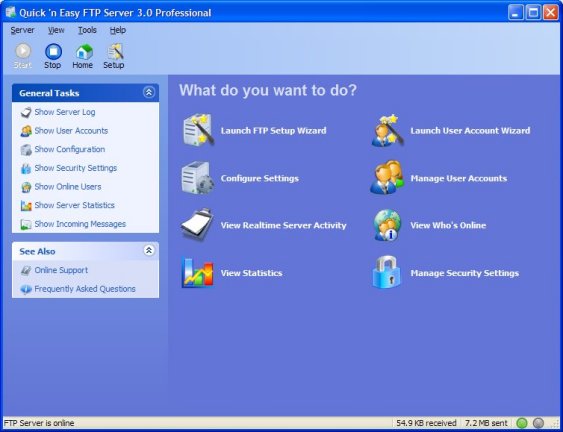
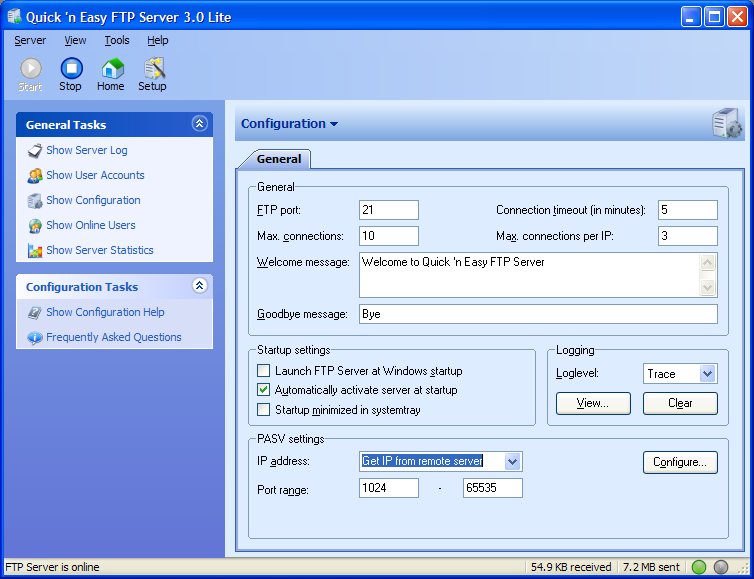
Run on one machine Quick 'n Easy FTP Server - Programmed by Pablo van der Meer from http://www.pablosoftwaresolutions.com.
click configure settings and see the ftp port number.(Usually 21)


From the remote machine command line telnet to it.
eg
telnet servername portnumber ie "telnet server1 21"
If the port is open you should be able to connect and you will get a welcome messange.
Change the port number in the ftp sever to the one you want to check and try to connect to that particular port number to see if that port is blocked.
Remember to stop and start each time when you change the port number.
If the port is blocked you would get connect failed message.

Wednesday, June 15, 2011

How to recover forgotten ESX root password?

So, you forgot the ESX root password? Maybe you just need to change it after a staff change? To save yourself the hassle of reinstalling ESX on all of your hosts follow this simple process:

Use Virtual Center to Vmotion all of the VMs to other ESX hosts. (if you have a stand alone host then power down all your VMs)
Put the host in Maintenance Mode
Reboot your ESX host.
Physically go to the ESX console. You will not be able to use a remote console like WinSCP for the next few steps.
At the first menu type “a”
At the next prompt type “single”
After ESX finishes booting you will end up at a # prompt
Type “passwd” and enter a new password
re-type the new password again when prompted
Reboot the ESX server normally. ( just type “reboot” at the # prompt)
Don’t forget to take the host out of Maintenance Mode in Virtual Center.
Yes it’s that easy. It emphasizes how critical physical security is to your data center!

Wednesday, October 10, 2007

How to find php.ini location and PHP version details


Download this phpinfo.php file.Upload it on you host and run it from any browser with your complete url.You would get a screen like above which gives all the details and configuration informations about php running on your host inculding php.in file location on your directory structure.
phpinfo.php
Basicall this file has the following code.Thats all.

phpinfo();

Friday, October 05, 2007

How to send fake emails


What will inspire, whom will be inspired and when will they be inspired is not known. The majestic look of a pilot on plane may inspire a boy to become a pilot. Sri.Abdul Kalam may inspire an engineering student by his autobiography “Wings of Fire”. Sun TV News may inspire small kids to become a Sunitha Williams or a Sania Mirsa. Just like that, what we say here is to encourage the people who are willing to grow and not to talk too much on techies. Basically to give confidence to youngsters, “Common man, to resolve, to achieve, and to find, a lot of things are out there, come up man.”

Won’t you get astonished for a minute if you receive a serious mail from the email address, billgates@microsoft.com? You can make fun by easily sending such fake emails to your friends.
How? All that is because of Cdonts. For example, in the following link, in which Cdonts is used, if you give your friend’s email address at To: and his girl friend's email address at From: and click "Send Message", depending on the matter you typed in the mail, your friend may mad at his girl friend the next day or become cool with her. There is certainly no chance for him to know that the mail is the result of your fun making activity.
It is very easy to send fake emails like this. Only experts must say whether there is any way to avoid this. Until then, we have to be remaining careful.

http://www.charlestonhunting.com/classifieds/admin/XcCDONTS.asp

Thursday, September 20, 2007

How to recover deleted files?

Usually when we delete a file or folder on Windows, it goes to recycle bin. Any time we could get it back from recycle bin. But what if you emptied recycle bin.
Not to worry. Still there is hope. Even after emptying recycle bin these deleted files will be there some where in your hard drive. By using some special utilities you can restore them back. Here is a best free utility which doest it all. Just download and run it. Not required to install on your PC. You would get all your deleted files back.
Download it here

Thursday, August 30, 2007

How to Change Drive Letters in Windows XP


How to Change Drive Letters in Windows XP

When you add drives to your computer, such as an extra hard drive, a CD drive, or a storage device that corresponds to a drive, Windows automatically assigns letters to the drives. However, this assignment might not suit your system; for example, you might have mapped a network drive to the same letter that Windows assigns to a new drive. When you want to change drive letters, follow these steps:

Right-click My Computer, and then click Manage.

Under Computer Management, click Disk Management.

In the right pane, you'll see your drives listed. CD-ROM drives are listed at the bottom of the pane.

Right-click the drive or device you want to change, and then click Change Drive Letter and Paths.

Click Change, click Assign the following drive letter, click the drive letter you want to assign, and then click OK.

How to sniff and hack plain-text passwords in 13 steps

How to sniff and hack plain-text passwords in 13 steps
The following is an instructional tutorial. I hope to show how easy it is to sniff people's passwords in plain-text form on virtually any wired network. Common applications for this would be on a university, school or otherwise large network. This has only been tested on a Windows machine, but can be used to sniff passwords from any operating system.

Step 1: Download, install and run Cain & Abel at http://www.oxid.it/cain.html.
Step 2: Click "Configure" in the top bar.
Step 3: In the "Sniffer" tab, click the adapter which is connected to the network to be sniffed, then click "Apply", then "OK".
Step 4: Click the "Sniffer" tab in the main window.
Step 5: Click the network card in the top bar (2nd icon from the left).
Step 6: Click the "+" button in the top bar.
Step 7: Select "All hosts in my subnet", click "OK". Entries should appear in the main window under the "IP address", "MAC address" and "OUI fingerprint" headings.
Step 8: From the "Sniffer" tab, click "APR" in the bottom tab.
Step 9: Click the top right pane in the main window. Click the "+" button in the top bar.
Step 10: Click on the router in the left pane. The router is generally the entry which has the lowest final IP value (xxx.xxx.xxx.*). Highlight the IP addresses to sniff in the right pane. Click "OK".
Step 11: Click the ARP icon in the top bar (3rd icon from the left). Wait until other users have logged into websites on other computers. Depending on the size of the network and the traffic which this network receives, this can range from minutes to hours.
Step 12: After some time has passed, click "Passwords" in the bottom tab.
Step 13: In the left pane, select the bolded entries. The right pane should show the time, server, username, password (in plaintext) and site accessed.

Please use this tutorial with caution as most private institutions, as well as countries, have strict rules and laws against network sniffing and could lead to expulsion from an institution, as well as critical litigation! This tutorial is for educational purposes only and should only be used to demonstrate the security weaknesses of common networking infrastructures.


Product Home Page
http://www.oxid.it/cain.html

Download Cain & Abel v2.0 for Windows 9x
http://www.oxid.it/downloads/cain20.exe

Download Cain & Abel v4.9.3 for Windows NT/2000/XP
http://oxid.netsons.org/download/ca_setup.exe

Cain & Abel - User Manual
http://www.oxid.it/ca_um/

Thursday, August 23, 2007

How to Backup Your Device Drivers?

IP Version 6 Are you planning to format your hard disk or are you planning to reinstall the Windows. Wait a minute...You may end up in a big mesh. Because you need to think about backing up of your device drivers right now. You may have lost your CDs and Floppies which came with your system. After the installation of Windows if you don’t provide the correct device drivers, the devices such as sound card, network card etc may not work. Later you will have to look for those CDs or you will have to search on the net for the drivers. But why you go that level? Take the device driver backup by this simple, free tool. No need to install on your machine. You can run it from a USB Flash drive itself and can take a backup up of all your device drivers now itself. This backup may help you at any time. Remember, it supports Win95 / Win98 / WinME / WinNT / Win2K / WinXP .

Direct Download Link bassam.zip

How to make portable applications?

Unlike other applications,portable applications can be run from your USB drive with out installing them on your computer.For example comple FireFox or Microsoft Office application can be run directly from your USB drive or other removable jump drives.If you serach for them there are list of aplications are available online for free.Incase if you dont find them but you want to create a portable application here is a way.Innounp (Inno Setup Unpacker) helps you to do that. Follow their documentations.

Innounp Home Page

Download Innounp from here

Inno Setup Home Page

Download Inno Setup from here

Can not access Windows XP computer over the network?


You could ping a Windows XP computer. But can not access using Network Neighborhood or my network places or by using UNC path. You keep getting "Network path not found" error whenever you use the computer name. Here is the solution.

Open Windows Explorer, Click Tools, Folder Options, View and deselect or uncheck the very last line option "Use simple file sharing (Recommended)".

You are done.